The whole engagement in one folder
A consulting team's context lives in Teams threads and three people's heads. Here is how we moved it into a SharePoint library, synced it to every laptop with OneDrive, and let Claude Code keep it as an LLM wiki.
Every consulting engagement I have been on has the same shape after week six. There is a statement of work nobody has reread since it was signed. There are forty decks, twelve of which are the current one. There is a Teams channel with the real decisions buried in it, and there are two or three people who actually know why things are the way they are. When someone new joins, one of those people loses a day.
This post is about the setup that fixed it for us, and it is deliberately boring. No platform, no vector database, no procurement. A folder in the client's SharePoint, synced to everyone's laptop with the OneDrive client that IT already installed, and a Claude Code session opened inside it. The folder is an LLM wiki in Andrej Karpathy's sense. The sync is free. The permissions are the client's own.
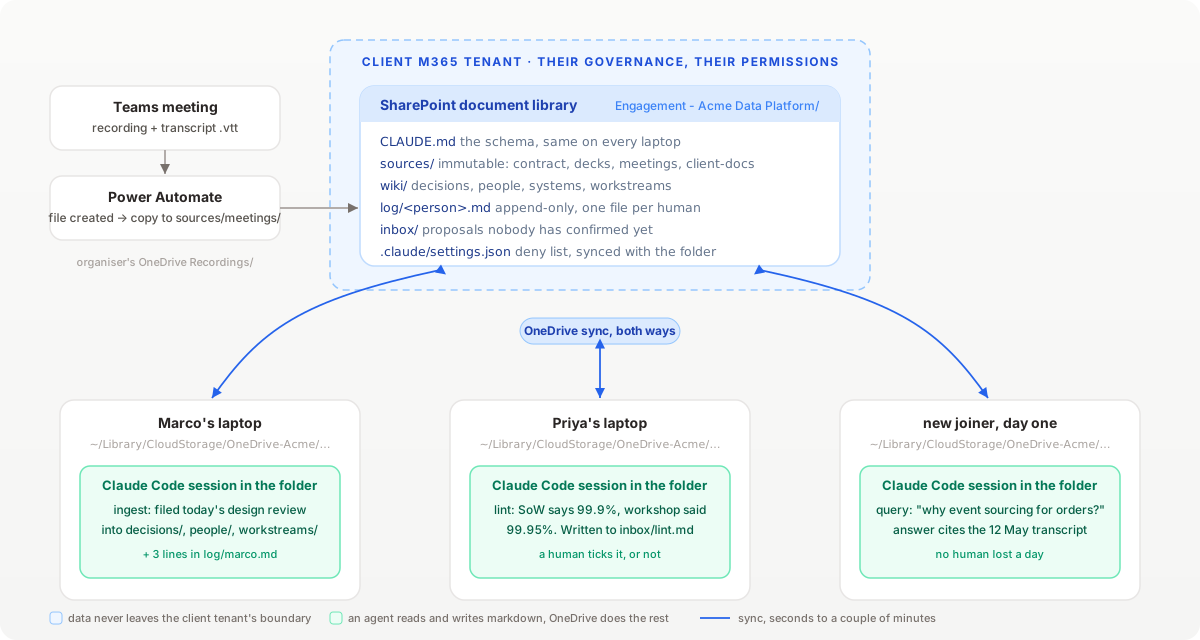
Why SharePoint, of all things
I tried Notion first, then a git repo. Both failed on the same point. A consulting team on a client site does not get to choose its tools. The client tenant decides where documents may live, which SaaS is approved, and who can see what. SharePoint is already inside that boundary. Every engagement has a document library on day one, the client's information governance already applies to it, and every laptop in the team already has OneDrive syncing it. Nobody has to install anything or ask anyone.
The second reason is that a document library is a folder. On a Mac the synced copy lives under ~/Library/CloudStorage/OneDrive-<TenantName>/, and a folder is the one thing an agent is genuinely good at working with. Claude Code does not know or care that the files are being mirrored to the cloud. It reads markdown, it edits markdown, and OneDrive does the rest.
The layout
The library is organised the way Karpathy describes, with one change for teams, which is that the log is per person.
Engagement - Acme Data Platform/
├── CLAUDE.md               the schema: what lives where, what may not change
├── sources/                immutable. nothing here is ever edited
│   ├── contract/           SoW, change requests, RAID as exported
│   ├── decks/              every deck, dated, as PDF
│   ├── meetings/           one folder per meeting, transcript + notes
│   └── client-docs/        architecture docs, policies, runbooks the client gave us
├── wiki/
│   ├── index.md            every page, one line each
│   ├── decisions/          one page per decision, with the meeting it came from
│   ├── people/             one page per stakeholder, role, what they care about
│   ├── systems/            one page per client system we touch
│   ├── workstreams/        current state of each workstream
│   └── open-questions.md
├── log/
│   ├── marco.md            append-only, one line per change I made
│   └── priya.md
└── inbox/                  things the wiki proposed and a human has not confirmed
The sources/ rule is the one that matters. A transcript is never edited, a deck is never replaced in place. If the wiki says something wrong, the fix is to re-ingest the source or to add a newer one. That means any page can be rebuilt from scratch, and it means when two people disagree about what was said, the answer is a file with a date on it.
Getting the meetings in
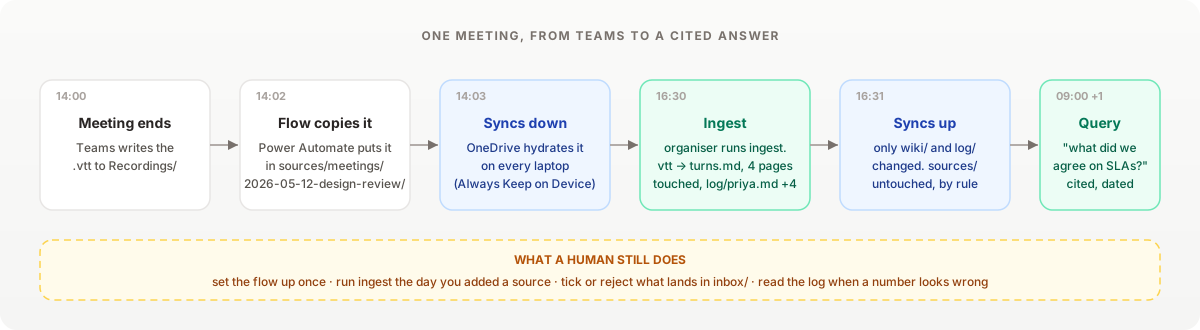
The wiki is only as good as what goes into sources/, and the richest source on any engagement is the meetings. Teams already transcribes them. The problem is that the transcript lands in the organiser's personal OneDrive under Recordings/, which is exactly where nobody will find it in three weeks.
A Power Automate flow moves it. The trigger is "When a file is created" on the organiser's Recordings folder, the action is "Copy file" into sources/meetings/ on the library, and a naming step prefixes the date. The whole flow is four boxes and took twenty minutes, most of which was finding the folder picker.
The .vtt that Teams produces is not pleasant for a model to read. Timestamps every few seconds, speakers repeated on every cue, and a lot of "yeah, yeah, no, exactly". A small script runs on ingest and collapses it into turns:
import re, sys
from pathlib import Path

CUE = re.compile(r"<v ([^>]+)>(.*?)</v>", re.S)

def turns(vtt: str):
    speaker, buf = None, []
    for who, text in CUE.findall(vtt):
        text = " ".join(text.split())
        if who != speaker and buf:
            yield speaker, " ".join(buf)
            buf = []
        speaker, buf = who, buf + [text]
    if buf:
        yield speaker, " ".join(buf)

src = Path(sys.argv[1])
out = src.with_suffix(".md")
lines = [f"# {src.stem}\n"]
lines += [f"**{who}:** {text}\n" for who, text in turns(src.read_text())]
out.write_text("\n".join(lines))
An hour-long meeting goes from about nine thousand lines of VTT to roughly two hundred lines of markdown, with the same words. The .vtt stays next to it, unedited, because that is the source.
The schema
CLAUDE.md at the root is what turns a folder of files into a wiki. Claude Code reads it at the start of every session opened inside the folder, so every team member gets the same rules without being told them. Ours is about a hundred lines. The parts that do the most work are these:
## Operations

- **ingest**: for each file in sources/ not yet listed in log/*.md, read it,
  update or create the wiki pages it affects, add a line to index.md if a page
  is new, and append one line per touched page to log/<your-name>.md.
  Never summarise a source into a single page. Spread it across the pages it
  belongs to (a meeting usually touches decisions/, people/ and a workstream).
- **query**: answer from wiki/ first. Every claim gets a citation in the form
  (sources/meetings/2026-05-12-design-review/transcript.md). If the wiki does
  not know, say so and name the source that would.
- **lint**: find pages that contradict each other or a newer source, decisions
  with no source, people pages not touched in 30 days, and open questions that
  a later meeting answered. Write the findings to inbox/lint.md as checkboxes.

## Rules

- sources/ is read-only. Do not edit, rename or move anything in it.
- A decision page must name the meeting it came from and who made the call.
- Do not create a page for a person from a single mention. Two sources or a
  human confirmation.
- Anything you are not sure belongs in the wiki goes in inbox/, not in wiki/.
The two operations we use most are ingest and query. Whoever adds a source runs the ingest, in their own session, the same day. Everyone runs queries. A new joiner's first afternoon is now "open a session in the folder and ask it why we chose event sourcing for the orders domain", and the answer comes back with the date of the meeting and the name of the architect who pushed for it.
What OneDrive does to you
This is the part I wish someone had written down.
Files On-Demand. By default OneDrive on macOS keeps cloud-only placeholders and downloads a file when something opens it. Claude Code's Read tool triggers a download, but a Grep across sources/ will silently search only what has been hydrated. Right-click the engagement folder, choose "Always Keep on This Device", and check Finder shows the solid tick on every file before you trust a search. We lost half a day to a transcript that "did not exist" because it had never been downloaded.
Conflicts. OneDrive does not merge. If two people edit index.md within the same sync window, the second one gets a copy named index-Marco's MacBook Pro.md and no warning worth the name. Three rules made this a non-problem. Many small pages rather than a few big ones, so two people rarely touch the same file. One log file per person, never a shared one. And ingest is run by the person who added the source, so two people are never ingesting the same meeting at the same time.
Latency. A change takes anywhere from five seconds to a couple of minutes to appear on a colleague's machine, depending on what the client's network is doing. The lint operation catches the case where someone queried a page that was about to change. It is not real-time and it does not need to be.
Paths with spaces. The synced root will be something like OneDrive-AcmeCorp/Engagement - Acme Data Platform/. Every script quotes its paths. Every script.
What the model is not allowed to see
The client's data stays in the client's tenant, which is the whole point of using their SharePoint. But the folder is on your laptop, and the agent reads what is on your laptop, so the deny list still matters. Ours keeps commercial documents out of the model entirely:
{
  "permissions": {
    "deny": [
      "Read(./sources/contract/rates/**)",
      "Read(./sources/client-docs/hr/**)"
    ]
  },
  "sandbox": {
    "enabled": true,
    "filesystem": {
      "denyRead": [
        "/Users/marco/Library/CloudStorage/OneDrive-AcmeCorp/Engagement - Acme Data Platform/sources/contract/rates/",
        "/Users/marco/Library/CloudStorage/OneDrive-AcmeCorp/Engagement - Acme Data Platform/sources/client-docs/hr/"
      ]
    }
  }
}
That .claude/settings.json lives in the folder and syncs with it, so the deny list is the same on every laptop. The sandbox denyRead block is there because permissions.deny only stops the file tools, not a shell cat. I have written about that distinction before and it applies twice as hard when the folder is not yours.
Two things you should also check with the client before starting. Which model provider the tenant has approved, and whether the SharePoint library carries a sensitivity label that forbids exactly this. Both are five-minute conversations if you have them in week one and month-long ones if you have them in week ten.
What changed
The measurable thing is onboarding. The last joiner was productive on day two rather than in week two. The less measurable thing is that arguments about what was agreed now end in about a minute, because someone asks the wiki and it cites a transcript.
The thing I did not expect is that the wiki caught the client contradicting themselves. The lint flagged that a data residency requirement stated in a March workshop was missing from a May architecture review, and it was right. That is a page in decisions/ now, with both sources cited, and it saved a rework we would have found in testing.
If you are going to build one, start with the meetings. Get the Power Automate flow running in the first week, before there is a backlog. Write CLAUDE.md before the first ingest, and make the sources/ rule the first line. Then open a session in the folder and let it do the filing.